Deprecated: Using ${var} in strings is deprecated, use {$var} instead in /var/www/vhosts/howtoexcel.info/public_html/Excel/wp-content/plugins/wp-super-cache/wp-cache-phase2.php on line 2981

Deprecated: Using ${var} in strings is deprecated, use {$var} instead in /var/www/vhosts/howtoexcel.info/public_html/Excel/wp-content/plugins/wp-super-cache/wp-cache-phase2.php on line 3005

Deprecated: Using ${var} in strings is deprecated, use {$var} instead in /var/www/vhosts/howtoexcel.info/public_html/Excel/wp-content/plugins/wp-super-cache/wp-cache-phase2.php on line 3046

Deprecated: Creation of dynamic property WhichBrowser\Analyser\Header\Useragent::$data is deprecated in /var/www/vhosts/howtoexcel.info/public_html/Excel/wp-content/plugins/wp-statistics/includes/vendor/whichbrowser/parser/src/Analyser/Header/Useragent.php on line 11

Deprecated: Creation of dynamic property WhichBrowser\Analyser\Header\Useragent::$options is deprecated in /var/www/vhosts/howtoexcel.info/public_html/Excel/wp-content/plugins/wp-statistics/includes/vendor/whichbrowser/parser/src/Analyser/Header/Useragent.php on line 12

Deprecated: Creation of dynamic property Google\Site_Kit\Core\Authentication\Setup::$proxy_support_link_url is deprecated in /var/www/vhosts/howtoexcel.info/public_html/Excel/wp-content/plugins/google-site-kit/includes/Core/Authentication/Setup.php on line 94

Deprecated: Constant FILTER_SANITIZE_STRING is deprecated in /var/www/vhosts/howtoexcel.info/public_html/Excel/wp-content/plugins/google-site-kit/includes/Core/Admin/Standalone.php on line 95

Deprecated: filter_input(): Passing null to parameter #4 ($options) of type array|int is deprecated in /var/www/vhosts/howtoexcel.info/public_html/Excel/wp-content/plugins/google-site-kit/includes/Core/Util/Input.php on line 64

Deprecated: filter_input(): Passing null to parameter #4 ($options) of type array|int is deprecated in /var/www/vhosts/howtoexcel.info/public_html/Excel/wp-content/plugins/google-site-kit/includes/Core/Util/Input.php on line 64

Deprecated: filter_input(): Passing null to parameter #4 ($options) of type array|int is deprecated in /var/www/vhosts/howtoexcel.info/public_html/Excel/wp-content/plugins/google-site-kit/includes/Core/Util/Input.php on line 64

Deprecated: filter_input(): Passing null to parameter #4 ($options) of type array|int is deprecated in /var/www/vhosts/howtoexcel.info/public_html/Excel/wp-content/plugins/google-site-kit/includes/Core/Util/Input.php on line 64

Deprecated: Creation of dynamic property Google\Site_Kit\Modules\AdSense\Web_Tag::$module_slug is deprecated in /var/www/vhosts/howtoexcel.info/public_html/Excel/wp-content/plugins/google-site-kit/includes/Core/Modules/Tags/Module_Tag.php on line 42

Deprecated: filter_input(): Passing null to parameter #4 ($options) of type array|int is deprecated in /var/www/vhosts/howtoexcel.info/public_html/Excel/wp-content/plugins/google-site-kit/includes/Core/Util/Input.php on line 64

Deprecated: Creation of dynamic property Google\Site_Kit\Modules\Analytics\Web_Tag::$module_slug is deprecated in /var/www/vhosts/howtoexcel.info/public_html/Excel/wp-content/plugins/google-site-kit/includes/Core/Modules/Tags/Module_Tag.php on line 42

Deprecated: filter_input(): Passing null to parameter #4 ($options) of type array|int is deprecated in /var/www/vhosts/howtoexcel.info/public_html/Excel/wp-content/plugins/google-site-kit/includes/Core/Util/Input.php on line 64

Deprecated: Creation of dynamic property Google\Site_Kit\Modules\Analytics_4\Web_Tag::$module_slug is deprecated in /var/www/vhosts/howtoexcel.info/public_html/Excel/wp-content/plugins/google-site-kit/includes/Core/Modules/Tags/Module_Tag.php on line 42

Deprecated: filter_input(): Passing null to parameter #4 ($options) of type array|int is deprecated in /var/www/vhosts/howtoexcel.info/public_html/Excel/wp-content/plugins/google-site-kit/includes/Core/Util/Input.php on line 64
Excel – Page 21 – How to Excel
Warning: Undefined variable $author_out in /var/www/vhosts/howtoexcel.info/public_html/Excel/wp-content/plugins/removehide-author-date-category-like-entry-meta/remove-author-date-and-category-metadata.php on line 147

Warning: Undefined variable $date_out in /var/www/vhosts/howtoexcel.info/public_html/Excel/wp-content/plugins/removehide-author-date-category-like-entry-meta/remove-author-date-and-category-metadata.php on line 160

Warning: Undefined variable $category_out in /var/www/vhosts/howtoexcel.info/public_html/Excel/wp-content/plugins/removehide-author-date-category-like-entry-meta/remove-author-date-and-category-metadata.php on line 173

Warning: Undefined variable $comment_out in /var/www/vhosts/howtoexcel.info/public_html/Excel/wp-content/plugins/removehide-author-date-category-like-entry-meta/remove-author-date-and-category-metadata.php on line 186

Warning: Undefined variable $edit_out in /var/www/vhosts/howtoexcel.info/public_html/Excel/wp-content/plugins/removehide-author-date-category-like-entry-meta/remove-author-date-and-category-metadata.php on line 198
Skip to content

How to Excel

Author: Excel

Posted on December 26, 2018September 29, 2021

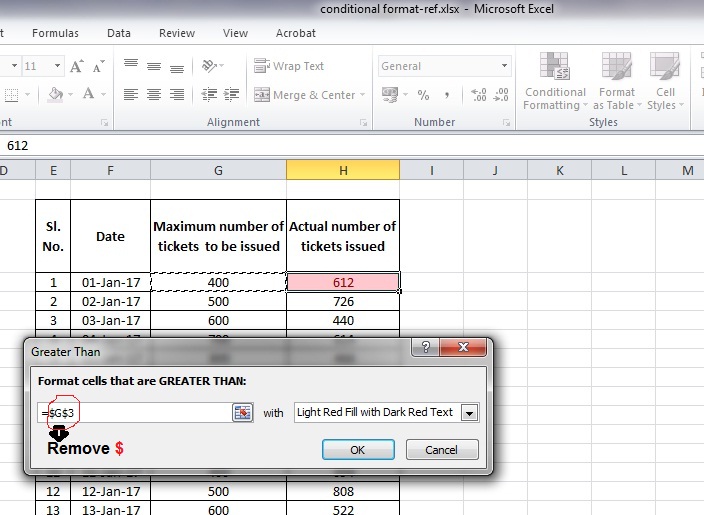
How to copy or drag down a condition in Conditional formatting? – MS Excel

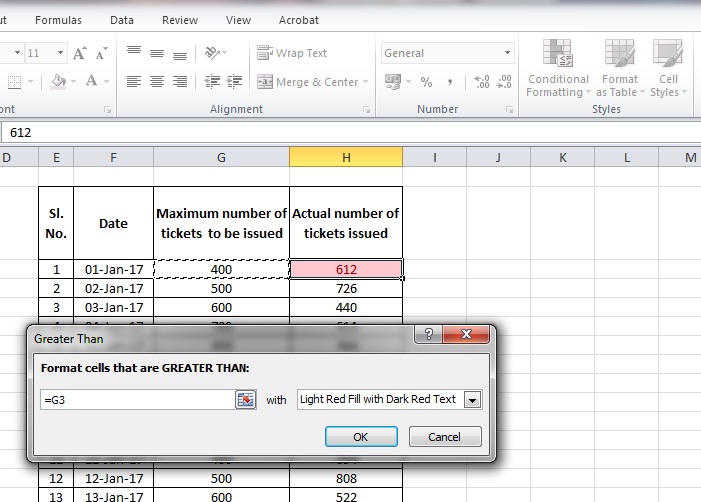
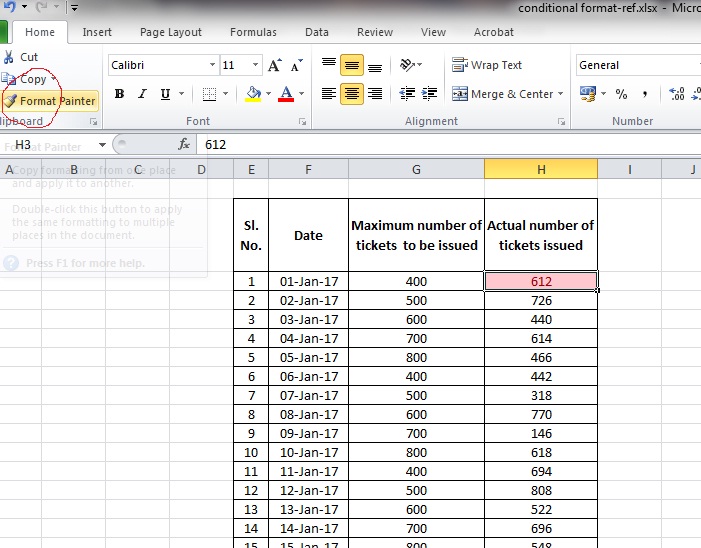
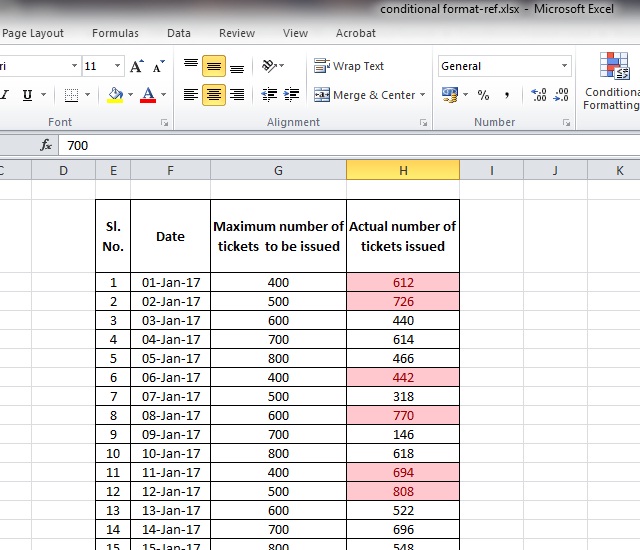
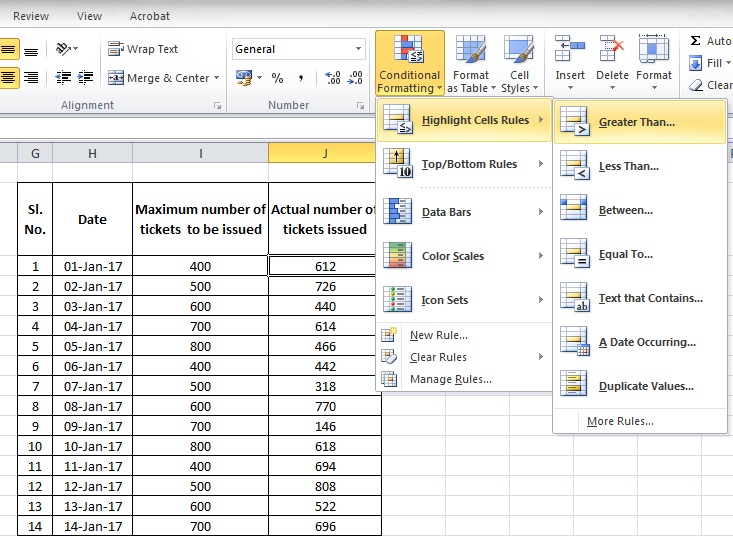
While copying or auto-fill the condition in conditional formatting, the reference cell remains a constant which becomes a hurdle when you want to apply a variable condition. This can be overcome by changing the constant to a variable by removing the $ symbol in the reference cell as below.
Download sample excel file

Posts navigation

Previous page Page 1 … Page 20 Page 21 Page 22 Page 23 Next page

Recent Comments

  • Kishore on How to change 1000 separator to show comma after 3 digits instead of 2 digits in Excel
  • akbar on How to change 1000 separator to show comma after 3 digits instead of 2 digits in Excel
  • .... on Ctrl + Shift + Down (or any arrow key) not working properly in MS Excel. How to Solve?
  • spx on Ctrl + Shift + Down (or any arrow key) not working properly in MS Excel. How to Solve?
  • Blaze on Ctrl + Shift + Down (or any arrow key) not working properly in MS Excel. How to Solve?
Proudly powered by WordPress